Allpairs User's Manual
Last Updated October 2010
Allpairs is Copyright (C) 2022 The University of Notre Dame. This software is distributed under the GNU General Public License. See the file COPYING for details.
Overview⇗
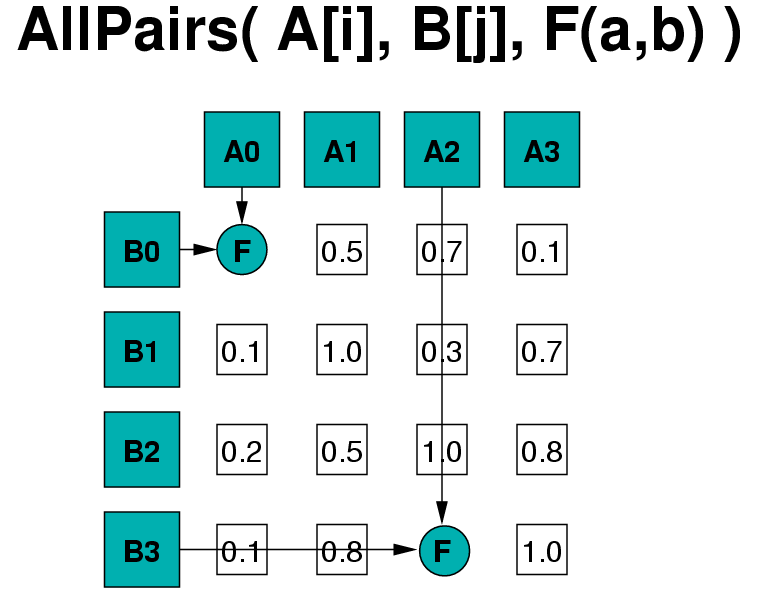 |
|
All-Pairs( array A[i], array B[j], function F(x,y) )
returns matrix M where
M[i,j] = F( A[i], B[j] )
---|---
The All-Pairs abstraction computes the Cartesian product of two sets, generating a matrix where each cell M[i,j] contains the output of the function F on objects A[i] and B[j]. You provide two sets of data files (as in the above figure, one set is setA = {A0, A1, A2, A3} and the other set is setB = {B0, B1, B2, B3}) and a function F that computes on them (later in the text we refer to this fuction F as either compare program or compare function. You may optionally provide additional parameters to control the actual computation, such as computing only part of the matrix, using a specified number of CPU cores. The abstraction then runs each of the functions in parallel, automatically handling load balancing, data movement, fault tolerance and so on for you.
All-Pairs on a Single Machine⇗
Let's suppose you have a whole lot of files that you want to compare all to
each other, named a, b, c, and so on. Suppose that you also have a
program named compareit that when invoked as compareit a b will compare
files a and b and produce some output summarizing the difference between
the two, like this: a b are 45 percent similar
To use the allpairs framework, create a file called set.list that lists each
of your files, one per line: a b c ... Then, invoke allpairs_multicore
like this: allpairs_multicore set.list set.list compareit The framework will
carry out all possible comparisons of the objects, and print the results one
by one: a a are 100 percent similar a b are 45 percent similar a c are 37
percent similar ...
For large sets of objects, allpairs_multicore will use as many cores as you have available, and will carefully manage virtual memory to exploit locality and avoid thrashing. Because of this, you should be prepared for the results to come back in any order.
All-Pairs on a Distributed System⇗
So far, we have introduced how to use All-Pairs abstraction on a single machine. But sometimes the All-Pairs problem is too big to allow a single machine to finish it in a reasonable amount of time, even if the single machine is multicore. So, we have built a Work Queue version of the All-Pairs abstraction which allows the users to easily apply the All-Pairs abstraction on clusters, grids or clouds.
To use the All-Pairs Work Queue version, you will need to start a All-Pairs
master program called allpairs_master and a number of workers. The workers
will perform the tasks distributed by the master and return the results to the
master. The individual tasks that the master program distributes are sub-
matrix computation tasks and all the tasks would be performed by the
allpairs_multicore program on the workers. For end users, the only extra
step involved here is starting the workers. Starting the All-Pairs master
program is almost identical to starting the All-Pairs multicore program.
For example, to run the same example as above on a distributed system:
allpairs_master set.list set.list compareit
This will start the master process, which will wait for workers to connect.
Let's suppose the master is running on a machine named barney.nd.edu. If you
have access to login to other machines, you could simply start worker
processes by hand on each one, like this: % work_queue_worker barney.nd.edu
9123 If you have access to a batch system like
Condor, you can submit multiple workers at
once: % condor_submit_workers barney.nd.edu 9123 10 Submitting
job(s).......... Logging submit event(s).......... 10 job(s) submitted to
cluster 298.
A similar script is available for Sun Grid Engine: % sge_submit_workers
barney.nd.edu 9123 10
In the above two examples, the first argument is the port number that the
master process will be or is listening on and the second the argument is the
number of workers to start. Note that 9123 is the default port number that
the master process uses. If you use the '-p' option in the allpairs_master
to change the listening port, you will need to modify the port argument in the
starting worker command accordingly.
Once the workers are running, the allpairs_master can dispatch tasks to each
one very quickly. If a worker should fail, Work Queue will retry the work
elsewhere, so it is safe to submit many workers to an unreliable system.
When the All-Pairs master process completes, your workers will still be
available, so you can either run another master with the same workers, remove
them from the batch system, or wait for them to expire. If you do nothing for
15 minutes, they will automatically exit by default. You can change this
worker expiration time by setting the '-t' option.
Note that condor_submit_workers and sge_submit_workers are simple shell
scripts, so you can edit them directly if you would like to change batch
options or other details.
Using an Internal Function⇗
If you have a very fast comparison program (less than a tenth of a second), the allpairs framework may be spending more time starting your program than actually accomplishing real work. If you can express your comparison as a simple function in C, you can embed that into the allpairs framework to achieve significant speedups.
To accomplish this, download
the CCTools source code, and build it. Then, look for the file
allpairs/src/allpairs_compare.c. At the top, you will see a function named
allpairs_compare_CUSTOM, which accepts two memory objects as arguments.
Implement your comparison function, and then rebuild the code. Test you code
by running allpairs_multicore on a small set of data, but specify CUSTOM
as the name of the comparison program. If your tests succeeed on a small set
of data, then proceed to using allpairs_master.
We have implemented several internal comparison functions as examples, including:
- BITWISE - Counts the number of bytes different in each object.
- SWALIGN - Performs a Smith-Waterman alignment on two genomic sequences.
- IRIS - Performs a similarity comparison between two iris templates.
Tuning Performance⇗
By default, both allpairs_master and allpairs_multicore will adjust to the
proprties of your workload to run it efficiently. allpairs_master will run a
few sample executions of your comparison program to measure how long it takes,
and then break up the work units into tasks that take abuot one minute each.
Likewise, allpairs_multicore will measure the number of cores and amount of
memory available on your system, and then arrange the computation to maximize
performance.
If you like, you can use the options to further tune how the problem is decomposed:
-tcan be used to informallpairs_masterhow long (in seconds) it takes to perform each comparison. If given,allpairs_masterwill not sample the execution, and will start the computation immediately.-xand-ycan be used to set the size of the sub-problem dispatched fromallpairs_mastertoallpairs_multicore-ccontrols the number of cores used byallpairs_multicore, which is all available cores by default.-bcontrols the block size of elements maintained in memory byallpairs_multicore, which is 3/4 of memory by default.
For More Information⇗
For the latest information about Allpairs, please visit our web site and subscribe to our mailing list.